
Introduction
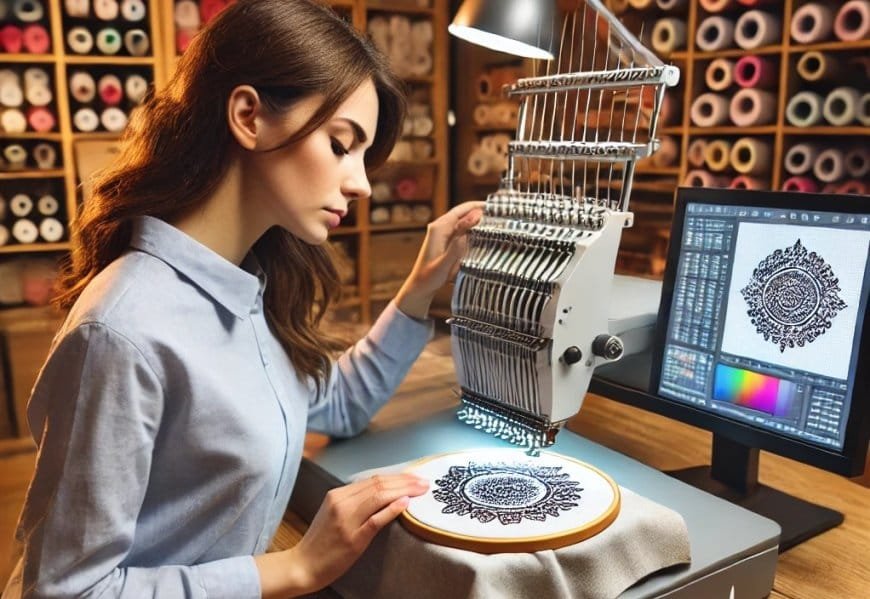
You have a brilliant JPG image ready to become your next embroidery masterpiece. The path seems simple: get the file into the EXP format your Melco or Bernina machine requires. But this is where many projects veer off course, leading to frustrating results like puckered fabric, broken threads, and designs that look nothing like your original art. The difference between a mess and a masterpiece lies in your approach. Learning how to convert JPG to EXP the right way means understanding that you’re not just changing a file extension—you’re engineering a stitch pattern. It’s a process that rewards preparation and smart choices over shortcuts. This guide is dedicated to the right way: a methodical approach that prioritizes the integrity of your design from the first pixel to the final stitch, ensuring your embroidery is consistently clean, professional, and trouble-free.
The “Right Way” Mindset: It’s Engineering, Not Conversion
The single most important tip is to reframe the entire task. You are not converting a file; you are digitizing an image. Your JPG is a flat picture. An EXP file is a multi-layered set of construction instructions for your embroidery machine.
Think of it like architecture:
-
Your JPG is the artist’s sketch of a building.
-
The EXP file is the complete set of engineered blueprints, wiring diagrams, and material specs.
You wouldn’t hand a sketch to a construction crew and expect a stable building. Similarly, you can’t hand a JPG to your machine and expect a clean stitch. The “right way” is about creating those detailed, intelligent blueprints. This mindset shift is the foundation for every tip that follows.
Tip 1: Begin with the Best Possible Blueprint (Your JPG)
Clean stitches start with a clean source. The quality of your input image is the most significant factor you control.
The Right Way to Prep Your JPG:
-
Prioritize Vector Files: If you have access to the original vector art (.AI, .EPS, .SVG), use it instead of the JPG. Vector graphics provide crisp, scalable paths that are infinitely easier to digitize accurately.
-
Simplify Relentlessly: Open your JPG in a basic photo editor. Your goal is to reduce complexity.
-
Increase Contrast: Make edges pop. This helps define shapes for digitizing.
-
Enlarge Small Text: Any text smaller than 1/4 inch (6mm) will likely become a blurry blob of thread. Enlarge it or remove it.
-
Thicken Fine Lines: Hairline details won’t stitch well. Bold them.
-
Eliminate Gradients and Shadows: Convert subtle shading into distinct, solid color blocks. Embroidery works in flat color zones.
-
-
Ensure High Resolution: A blurry, pixelated JPG guarantees a poorly defined stitch file. Always start with the highest resolution version available.
This 10-minute preparation step dramatically increases the chances of a clean, recognizable final design.
Tip 2: Choose the Right Tool for the Job
The “right way” to convert JPG to EXP involves selecting a method that respects the complexity of the task.
Option A: Professional Digitizing Services (The Guaranteed Right Way)
For most people seeking a clean result, this is the optimal path.
-
How it Works: You upload your prepped JPG to a reputable service. A human expert digitizes it using professional software, applying proper underlay, stitch types, and pull compensation specifically for your target fabric.
-
Why it’s Right: You are paying for skill and experience. You receive an optimized EXP file engineered to stitch cleanly on the first try. It saves you time, materials, and frustration.
Option B: Professional Digitizing Software (The Hands-On Right Way)
If you are committed to learning the craft, invest in quality software like Hatch Embroidery, Wilcom, or Pulse.
-
How it Works: You manually trace and digitize the image, giving you total control over every stitch parameter.
-
Why it’s Right: It teaches you the principles of clean digitizing. You learn how underlay stabilizes, how density affects feel, and how pull compensation maintains shape.
The Wrong Way (What to Avoid): Using fully automated online “JPG to EXP converters.” These services ignore critical steps like underlay and fabric-specific settings, producing files that are almost guaranteed to cause puckering and poor registration. The cheap price is never worth the ruined materials.
Tip 3: Never, Ever Skip the Underlay
This is the most important technical tip for cleaner stitches. Underlay is the foundation of your embroidery. It’s a series of stitches laid down before the decorative top stitching.
The Right Way to Think About Underlay:
-
Function: It stabilizes the fabric, preventing the shifting and puckering that destroys design cleanliness.
-
Application: A proper digitizer (whether you or a professional) will apply different types of underlay (edge-walk, center-walk, zigzag) to different parts of your design based on the fabric.
-
Result: With a good underlay, your top stitches will lie flat and smooth, colors will be vibrant, and the design will be locked securely to the fabric.
An EXP file created without underlay is built on sand. It will pucker and distort, no matter how beautiful the top stitches are.
Tip 4: Communicate the Fabric to Your Digitizer
If you use a service, this is your most critical instruction. If you use software, this is your guiding parameter.
The Right Way to Specify: Always tell your digitizer or input into your software: “This design will be stitched on [specific fabric].” Examples: “heavyweight cotton twill cap,” “stretchy polyester polo,” “plush fleece.”
Why this is Non-Negotiable: Different fabrics behave dramatically differently under the needle. A design digitized for a stiff hat will pucker on a stretchy t-shirt. The right density, underlay, and pull compensation settings are entirely dependent on the fabric. Providing this information ensures the EXP file is engineered for your specific application, which is the very definition of doing it the right way.
Tip 5: Embrace the Test Stitch
The right way is a process, not a single action. Your perfectly prepared EXP file is still a theory until it’s proven on fabric.
The Right Way to Test:
-
Hoop a scrap piece of the exact fabric you’ll use for the final project.
-
Use the same stabilizer you plan to use.
-
Stitch the entire design.
-
Analyze with a Critical Eye: Is it flat? Are all details clear? Do the colors align perfectly (good registration)? Does it feel appropriately flexible?
This test stitch is your quality control checkpoint. If there are minor issues (a slight pucker, a density that’s too tight), you can now go back to your digitizer for a precise revision or adjust your software settings. This iterative step transforms a “good enough” file into a perfect one.
Your Step-by-Step Workflow for Success
To tie all these tips together, follow this “right way” workflow:
-
Prepare: Simplify and enhance your JPG. Know your target fabric and final size.
-
Choose: For guaranteed results, select a Professional Digitizing Service. For learning and control, select Professional Software.
-
Specify: Communicate all details (fabric, size, any special notes) to your service or input them into your software.
-
Validate: Run the mandatory test stitch on scrap fabric.
-
Refine: Based on the test, request revisions or make adjustments.
-
Execute: Once the test stitch is clean, proceed to your final garment with total confidence.
Conclusion
Learning how to convert JPG to EXP the right way is an investment in the quality and professionalism of every project you undertake. It’s a philosophy that values preparation, chooses intelligent tools over deceptive shortcuts, respects the physics of fabric through proper underlay and material-specific settings, and insists on real-world validation through a test stitch. By adopting this methodical approach, you move from hoping your design stitches out cleanly to knowing it will. Ditch the one-click converters and embrace the process that truly works. Your embroidery machine is a precision instrument; feed it the meticulously engineered EXP files it deserves, and you’ll be rewarded with consistently cleaner, sharper, and more beautiful stitch designs.